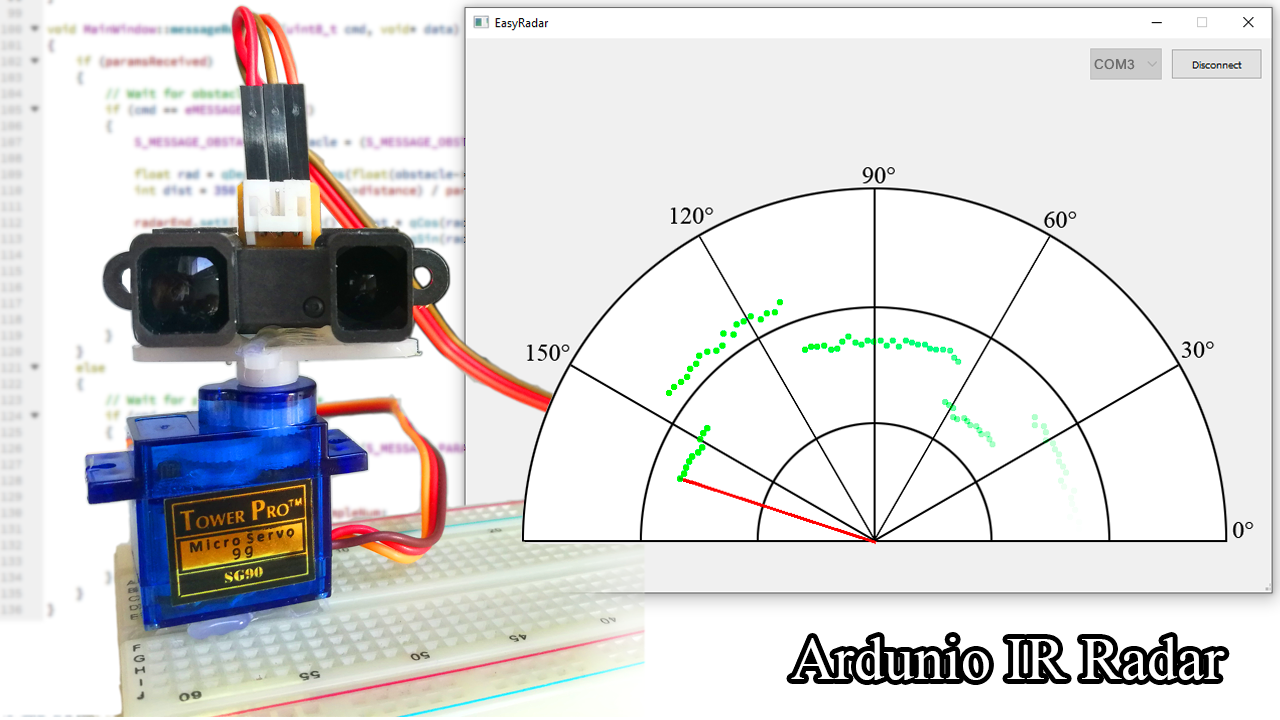
In this small project I would like to show you how can you create a simple Radar at Home with Arduino. There are many similar projects on the internet, but they are all using an ultrasonic sensor to measure the distance. In this project I use an infrared sensor for distance measurement.
My goal is to create a very simple and cheap LIDAR system with it and implement a mapping device.
You will need the following materials:
- Arduino (I used a Maple Mini)
- Sharp distance sensor (I used Sharp GP2Y0A02YK0F)
- Micro Servo (9g)
- Breadboard, wires
- Optional: 4.7k Resistor, 100nF Capacitor
Ultrasonic VS Infrared Sensor
The main difference between ultrasonic and infrared distance sensors is that the ultrasonic sensor measures distance in wider range. Therefore it is not able to precisely locate the position of an obstacle. It means that it measures the distance of the closest object which is located inside a ~ +-30° angle range.
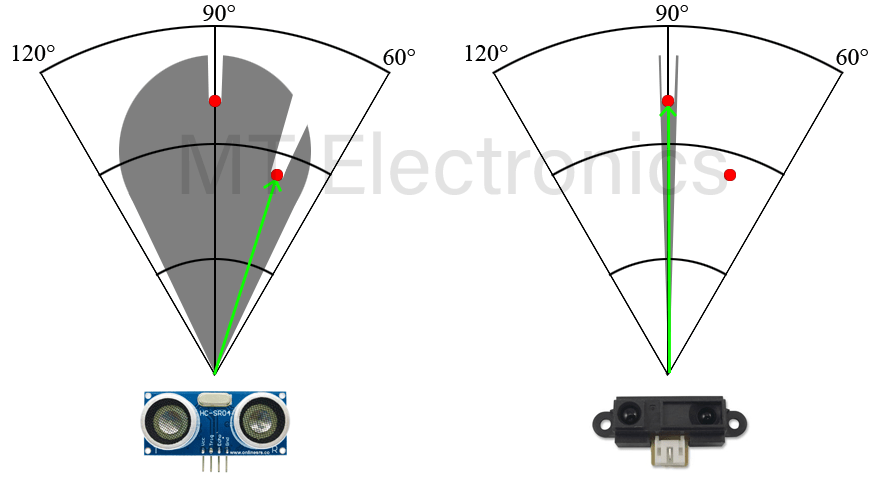
Of course, it doesn’t mean that the Sharp sensor is better. Sometimes this property can be very useful (e.g. used by drones to measure height from ground). The right choice is totally depending on the requirements of your project.
Schematic
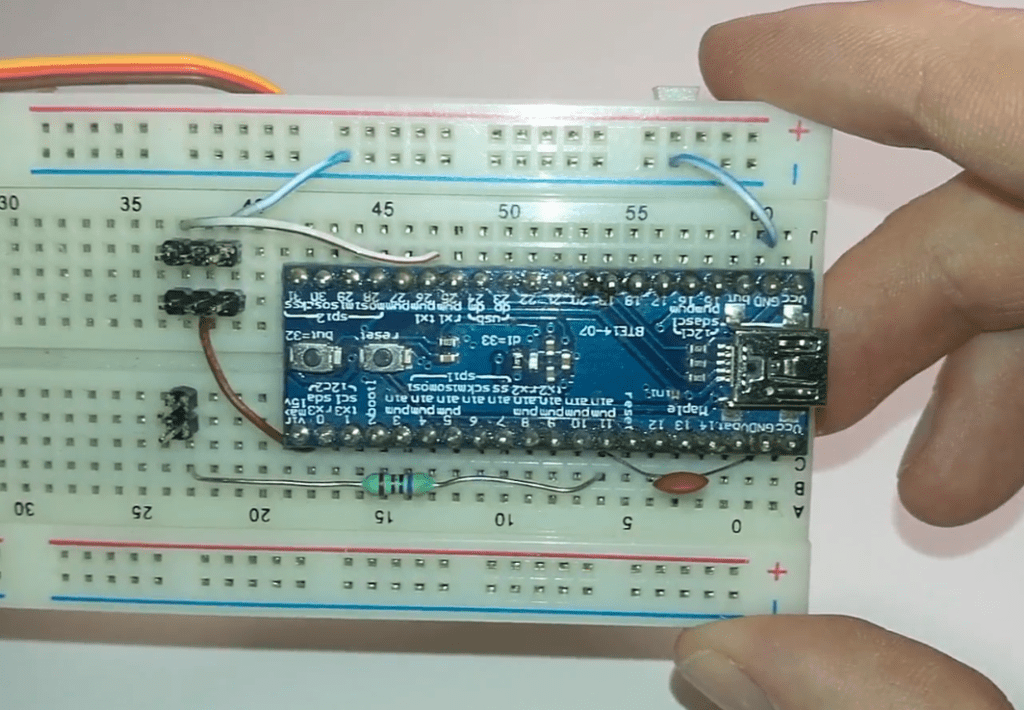
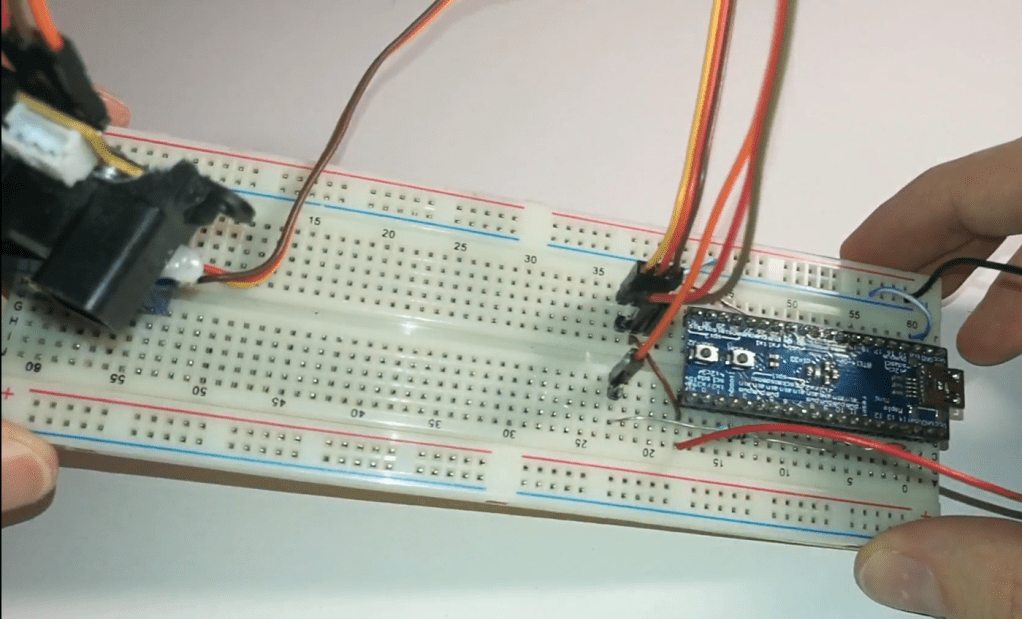
It is very simple to make the connection between parts. Select a PWM Output and an Analog Input on your Arduino board and connect the Servo and Sharp distance sensors to those pins. I used the following pins for this purpose:
- PA0: Analog input for Sharp distance sensor
- PA9: PWM Output for Servo
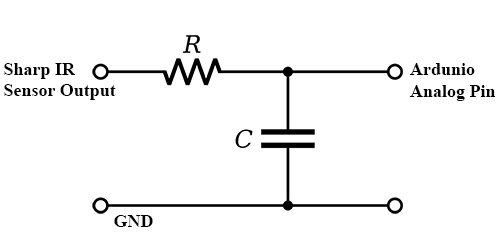
Sometimes the Sharp IR Sensor can have noisy output, therefore you have to put a simple Low Pass Filter on it. I used a 4.7k resistor and a 100nF capacitor to reduce the noise on the analog pin. Besides that I also filtered the measured value in the code by reading it multiple times and calculating the average.
Sensor Characteristic
Unfortunately the used infrared distance sensor has non-linear characteristic. It means that to get the distance, it is not enough to multiply the measured ADC value with a constant value and adding another constant value to it.
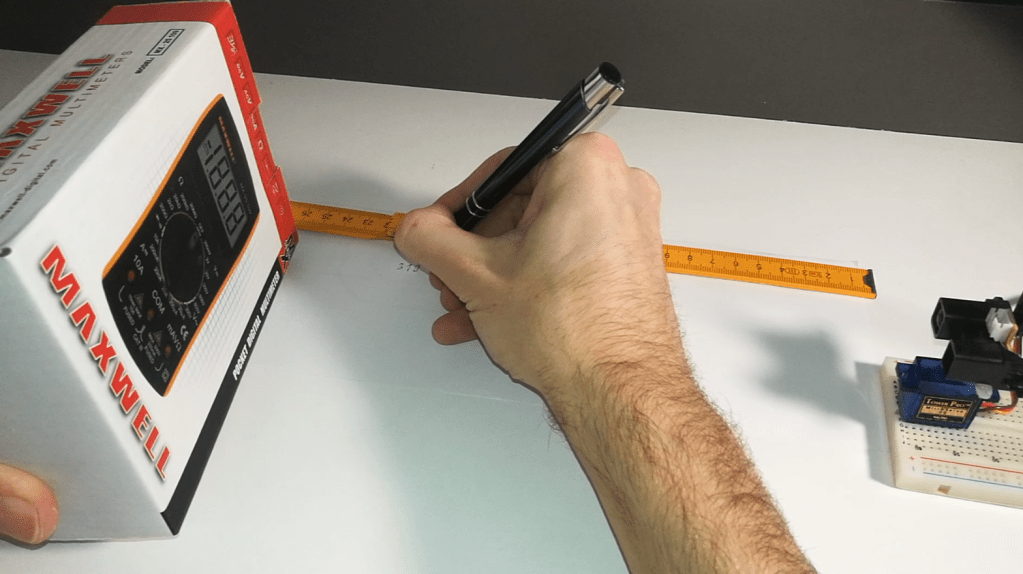
Although the datasheet of the sensor provides the characteristic, I prefer to measure it by myself in the specific project (it could depend on the used voltage). For this, I made pairs from the measured ADC Value and distance for every 10 cm. (My sensor was able to measure correct distance from 12 cm).
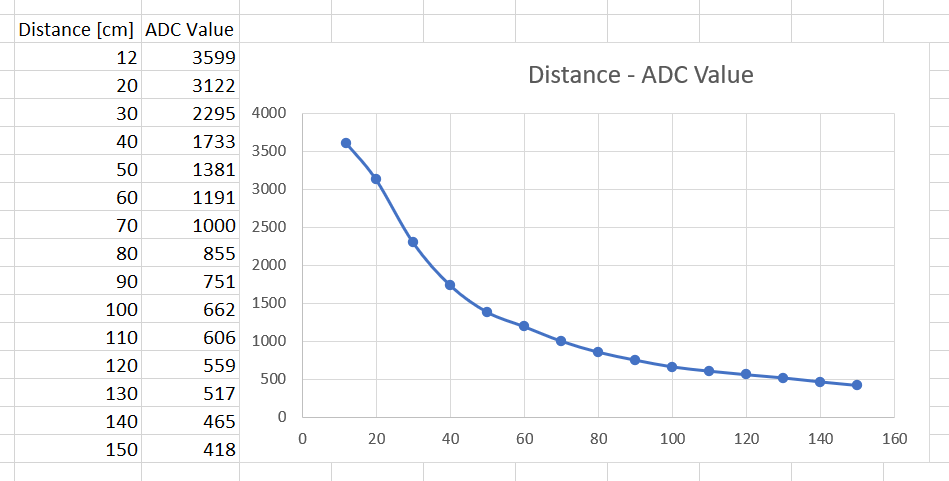
I used these pairs in the code to get the correct distance with Linear Interpolation.
// Structure to store ADC Value - Distance pairs
typedef struct {
  float distance;
  float adcVal;
} S_DIST_ADC_MAP;

// ADC Value - Distance pairs
// Fill it measured SHARP Sensor characteristic values.
S_DIST_ADC_MAP distAdcMap[] = {
  {12,  3599},
  {20,  3122},
  {30,  2295},
  {40,  1733},
  ...
};

// Function to get distance [cm] from measured ADC Value
float getDistance(float adcVal)
{
  float distance = DISTANCE_MAX;

  // Linear interpolation from measured ADC value and MAP.
  for (int i = 1; i < (sizeof(distAdcMap)/sizeof(S_DIST_ADC_MAP)); i++)
  {
    if (adcVal > distAdcMap[i].adcVal)
    {
      float factor = (adcVal - distAdcMap[i].adcVal)/(distAdcMap[i-1].adcVal - distAdcMap[i].adcVal);
      distance = factor * (distAdcMap[i-1].distance - distAdcMap[i].distance) + distAdcMap[i].distance;
      break;
    }
  }

  return distance;
}
You will find a simple Arduino code at the end of document, to measure ADC Value during characteristic measurement.
Serial Communication
I used serial communication to send the measured angle-distance values to the PC. Since I have to send multiple bytes and different type of messages, I designed a simple communication protocol.
| Field | Size | Offset | Description |
| Sync | 2 | 0 | Indicates start of message. 0x55AA. |
| Checksum | 1 | 2 | Data validation. Start from 0x55. |
| CMD | 1 | 3 | Command identifier |
| Data | 0…MAX | 4 | Payload |
This procotol makes able to define different message types in a generic way. In this project I used 2 message types:
- Parameters: Used to send parameters to PC Application, defined on Arduino like maximum distance and number of obstacles in a round.
- Obstacle: Used to send a detected obstacle. It is identified by angle of the servo and measured distance. The x-y position will be calculated by PC application.
Qt Application
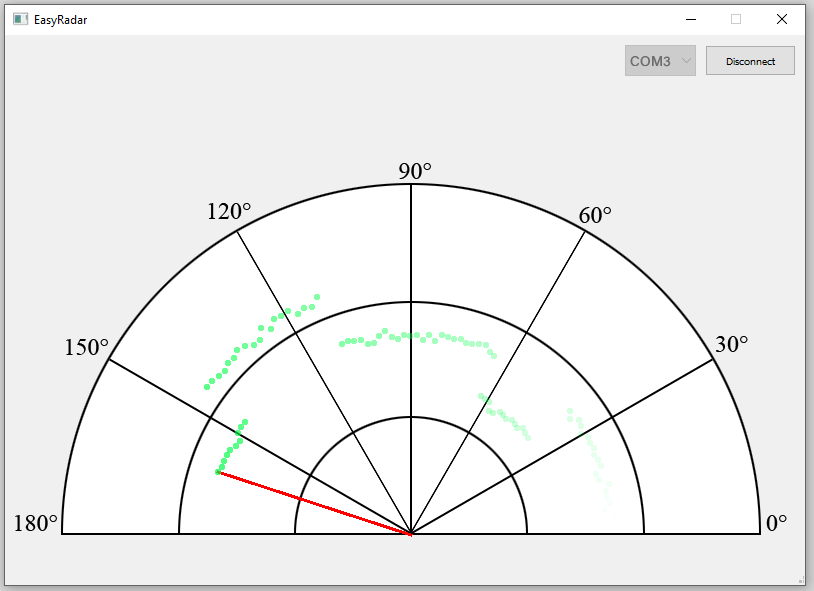
To communicate with Arduino and draw the measured points like a radar I made a PC Application in Qt (C++). It receives some parameters (defined on Arduino) and the measured distance points.
Arduino Source Code
Characteristic Measurement
void setup()
{
  Serial.begin(115200);
}

void loop()
{
  float adcVal;

  // Read sharp sensor analog value and use a simple filter on it
  adcVal = 0.0f;
  for (int i = 0; i < 50; i++)
  {
    adcVal += analogRead(PA0);
    delay(10);
  }
  adcVal /= 50.0f;

  // Print ADC Value
  Serial.println(adcVal);
}
Radar
You can customize some paremeters at the top of the document with macros.
Note, that if you change the characteristic of the Sharp distance sensor, you have to modify distAdcMap[] array values!
#include <Servo.h>

// ------------------------------------------------------------
// User parameters
// ------------------------------------------------------------
// Define pin where Sharp sensor is located.
#define SHARP_PIN       PA0
// Define pin where servo is located.
#define SERVO_PIN       PA9
// Define the maximum distance you want to measure in [cm].
#define DISTANCE_MAX    150
// Define the angle value that servo will step between measurements.
#define SERVO_STEP      2
// Define the delay in [ms] between measurements.
#define MEAS_DELAY_MS   30


// ------------------------------------------------------------
// Message handling
// ------------------------------------------------------------
// Sync value in message header
#define MSG_SYNC                (0x55AA)
// Start of checksum calculation in message header
#define MSG_CHECKSUM_START      (0x55)
// Maximum size of a message
#define MSG_MAX_SIZE            (64)

// Header of message structure
typedef struct
{
    uint16_t sync;
    uint8_t checkSum;
    uint8_t cmd;
} S_MSG_HEADER;

// Message: Parameters
typedef struct
{
    uint16_t distanceMax;
    uint16_t sampleNum;
} S_MESSAGE_PARAMETERS;

// Message: Obstacle
typedef struct
{
    uint16_t angle;
    uint16_t distance;
} S_MESSAGE_OBSTACLE;

// Message identifiers
typedef enum
{
    eMESSAGE_PARAMETERS,
    eMESSAGE_OBSTACLE,
} E_MESSAGE_CMD;

// Function to send a message to PC Application
void sendMessage(uint8_t cmd, void* data)
{
  // Structure for message to send
  static struct
  {
    S_MSG_HEADER header;
    uint8_t data[MSG_MAX_SIZE];
  } sendData;
  uint8_t msgSize;

  // Get size of data based on command
  switch (cmd)
  {
    case eMESSAGE_PARAMETERS:
      msgSize = sizeof(S_MESSAGE_PARAMETERS);
      break;
    case eMESSAGE_OBSTACLE:
      msgSize = sizeof(S_MESSAGE_OBSTACLE);
      break;
  }

  // Fill header of message
  sendData.header.cmd = cmd;
  sendData.header.sync = MSG_SYNC;
  sendData.header.checkSum = MSG_CHECKSUM_START;

  // Fill data bytes
  for (uint8_t i = 0; i < msgSize; i++)
  {
    sendData.data[i] = ((uint8_t*)(data))[i];
    sendData.header.checkSum += sendData.data[i];
  }

  // Send composed message to PC
  Serial.write((uint8_t*)&sendData, sizeof(S_MSG_HEADER) + msgSize);
}

// ------------------------------------------------------------
// Distance calculation
// ------------------------------------------------------------
// Structure to store ADC Value - Distance pairs
typedef struct {
  float distance;
  float adcVal;
} S_DIST_ADC_MAP;

// TODO
// ADC Value - Distance pairs
// Fill it measured SHARP Sensor characteristic values.
S_DIST_ADC_MAP distAdcMap[] = {
  {12,  3599},
  {20,  3122},
  {30,  2295},
  {40,  1733},
  {50,  1381},
  {60,  1191},
  {70,  1000},
  {80,  855},
  {90,  751},
  {100, 662},
  {110, 606},
  {120, 559},
  {130, 517},
  {140, 465},
  {150, 418},
};

// Function to get distance [cm] from measured ADC Value
float getDistance(float adcVal)
{
  float distance = DISTANCE_MAX;

  // Linear interpolation from measured ADC value and MAP.
  for (int i = 1; i < (sizeof(distAdcMap)/sizeof(S_DIST_ADC_MAP)); i++)
  {
    if (adcVal > distAdcMap[i].adcVal)
    {
      float factor = (adcVal - distAdcMap[i].adcVal)/(distAdcMap[i-1].adcVal - distAdcMap[i].adcVal);
      distance = factor * (distAdcMap[i-1].distance - distAdcMap[i].distance) + distAdcMap[i].distance;
      break;
    }
  }

  return distance;
}

// ------------------------------------------------------------
// Application
// ------------------------------------------------------------
// Global variables
Servo myServo;
int servoVal = 0;
int servoDir = SERVO_STEP;
S_MESSAGE_OBSTACLE msgObstacle;
S_MESSAGE_PARAMETERS msgParameters;

void setup()
{
  Serial.begin(115200);
  myServo.attach(SERVO_PIN);
  myServo.write(servoVal);

  msgParameters.distanceMax = DISTANCE_MAX;
  msgParameters.sampleNum = (180/SERVO_STEP);
}

void loop()
{
  float adcVal;
  float distance;

  // Send parameters at start
  if (servoVal == 0)
    sendMessage(eMESSAGE_PARAMETERS, &msgParameters);

  // Read sharp sensor analog value and use a simple filter on it.
  adcVal = 0.0f;
  for (int i = 0; i < 10; i++)
    adcVal += analogRead(SHARP_PIN);
  adcVal /= 10.0f;
  distance = getDistance(adcVal);

  // Compose send data structure from measured values
  msgObstacle.angle    = servoVal;
  msgObstacle.distance = (uint16_t)distance;
  sendMessage(eMESSAGE_OBSTACLE, &msgObstacle);

  // Set servo to next position
  if (servoVal >= 180)
    servoDir = -SERVO_STEP;
  else if (servoVal <= 0)
    servoDir = +SERVO_STEP;

  servoVal += servoDir;
  myServo.write(servoVal);

  // Wait until new measurement
  delay(MEAS_DELAY_MS);
}


Vélemény, hozzászólás?